
We recently threw a bunch of AAA games at the new 14-inch MacBook Pro to see what would happen.
And as expected, the M1 Pro performed well, reaching gaming performances never seen before on an Apple laptop. But the MacBook Air also impressed us when it was released last year alongside the first-generation M1 chip, and it’s still a best-seller for Apple.
So that begs the question, how does the M1 Air compare to the new M1 Pro? Is the M1 Pro, which is twice as expensive as the M1 Air, worth its 2,000 dollars price tag?
Today we’re comparing the new 14-inch MacBook Pro powered by the new M1 Pro Chip, with the 13-inch MacBook Air, powered by the first generation M1 chip.
More M1 gaming? Visit our M1 Supported Games list for 100+ Mac games we have tested and confirmed as M1-compatible.
M1 Pro vs M1 Air gaming benchmarks
We’ll be testing the following machines:
- A 14-inch MacBook Pro featuring an 8-Core CPU, 14-Core GPU, and 16GB of Unified Memory
- A 13-inch MacBook Air featuring an 8-Core CPU, 7-Core GPU, and 8GB of Unified Memory
We’ll be benchmarking four different games on each machine: Total War: Warhammer 2, Shadow of the Tomb Raider, F1 2017, and Deus Ex: Mankind Divided.
Every one of these games has a handy in-game benchmark, which will allow us to precisely compare performance between our test machines.
Let’s get started.

Total War: Warhammer 2
The first game we’ll test is Total War: Warhammer 2, arguably the most popular Total War available on Mac.
Total War games are known for the scale of their battles, with hundreds of soldiers on a single battlefield, each individually animated. The Warhammer entries add to that with Orcs, dragons, and magic spells being cast for one of the more demanding games on macOS.
But how did the M1 MacBook Air do? Total War Warhammer 2 doesn’t have a native M1 version yet, which means this is the Intel version running through Rosetta 2.
On Medium settings and 1200p resolution, the M1 Air runs the game at a solid enough 31 FPS.
The 14-inch M1 Pro, on the other hand, can run it at 65 FPS, which is more than double the performance.
If 31 FPS on the M1 Air doesn’t sound high enough to you, when running the game at 900p resolution, the M1 Air can run it at 50 FPS. With that resolution, the M1 Pro can run the game at 99 FPS, which is again roughly double the performance.
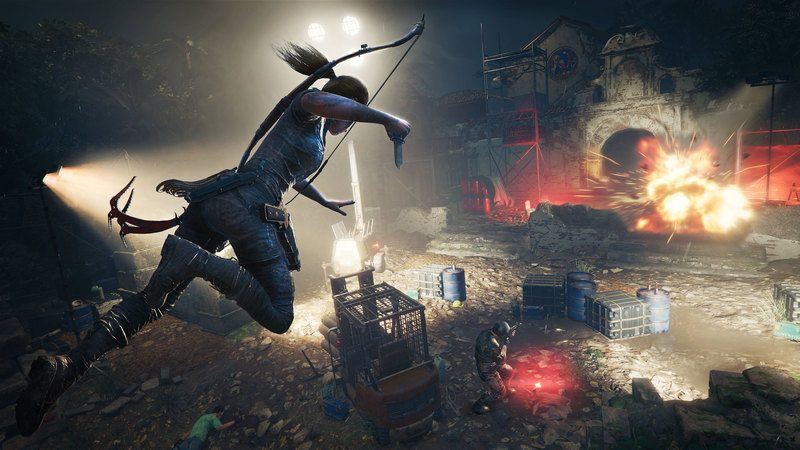
Shadow of The Tomb Raider
Shadow of the Tomb Raider is the latest Tomb Raider game from Square Enix and ported to MacOS by Feral Interactive.
Shadow of the Tomb Raider is often used for M1 benchmarks and that’s because it’s a beautiful game with great graphics, and it’s also well optimized for macOS. In our opinion, this is one of the best action adventure games available on macOS.
The game lacks a native ARM version, which means that it also requires Rosetta 2 to run on M1 Macs. But as a port from Feral Interactive, Shadow of the Tomb Raider makes great use of the Metal graphics API.
Still, it remains a demanding game, especially on the M1 Air.
With Graphics set to Medium presets and 1200p resolution, the M1 Air can run the game at 23 FPS. The 14-inch M1 Pro, on the other hand, can run it at 52 FPS, which is again, more than double the performance.
On the Air, you’ll have to lower the settings for more acceptable performance. Usually, we aim for at least 30 FPS for a decent gaming experience.
When running the game at 900p resolution instead, the M1 Air can run it at 33 FPS, which is good enough. At those settings, the M1 Pro can get 72 frames per second.

F1 2017
F1 2017 is a game you’ll rarely see benchmarked around here. And that’s too bad because even though it’s a few years old, it’s still one of the best-looking racing games available on Mac.
Its rosters may be outdated but just look at it. F1 2017 features top-notch graphics and an excellent driving experience.
As before, F1 2017 doesn’t have an M1 native version, which means it is again an Intel game running through Rosetta 2. Still, like every Feral Interactive game, it makes great use of the Metal API and can be considered a top-notch Mac port.
With Graphics Detail set to Medium and 1200p resolution, the M1 Air runs the game at an impressive 50 FPS. The 14-inch M1 Pro can run it at 70 FPS, which is better, but the difference between the 2 machines is not nearly as big as for the other games.
When running the game at 900p resolution, the M1 Air can run it at 59 FPS, whereas the M1 Pro can run it at 82. Either way, performance is good enough at 1200p, therefore there is no reason to lower the settings.

Deus Ex: Mankind Divided
Mankind Divided has always been a challenging game to run on Mac. In fact, it could barely run on the vast majority of Intel-Macs, largely thanks to its nature as a first-person immersive sim – meaning objects can be picked up and moved, putting plenty of strain on the CPU.
Our M1 Machines definitely do a better job, but performance remains limited.
With Graphics set to Medium and 1200p resolution, the M1 Air runs the game at a limited 24 frames per second. The 14-inch M1 Pro can run it at 53 FPS, which is again, more than double the performance, with numbers close to Shadow of the Tomb Raider’s.
When running the game at 900p resolution, the M1 Air can run Mankind Divided at 35 FPS, whereas the M1 Pro can run it at 71.
Your Turn
So is the M1 Pro worth double the cost of the M1 Air? The numbers themselves say yes. For the majority of the games tested, you can expect from the M1 Pro at least double the performance of the M1 Air.
But buying decisions are much more complicated than that. And let’s be honest here, if you’re looking for a pure gaming machine, you’ll be better off with a Windows laptop or a console. That’s clear.
But Macs are so much more than that. We choose Macs for many other reasons, and in many ways playing games on a Mac is essentially an added bonus.
If your work or daily usage requires high performance, go for the M1 Pro. The computing and graphical power of the M1 Pro is indisputable. Video editing, for example, is a breeze with these machines. So much so, that it is hard to believe how they can compete with high-end workstations.
If you’re just looking for a laptop for normal day-to-day tasks, the MacBook Air is an affordable machine.
So should you get the M1 Air or the M1 Pro? If you’re gaming, go Windows! But if you’re looking for the added grunt to power your creative projects, it’s well worth springing for a laptop packing the new M1 Pro chip.

“The computing and graphical power of the M1 Pro is indisputable”
I’ll need to take French lessons!